

On this page
Most developers are introduced to Redis with one sentence: "It's a cache."
And yes, Redis is an exceptional cache. But if that's all you're using it for, you're leaving a lot of power on the table.
Real production systems use Redis for session management, real-time leaderboards, message streaming, distributed coordination — and increasingly, as core infrastructure for AI agents. Redis has quietly evolved from a simple key-value store into one of the most versatile tools in modern backend architecture.
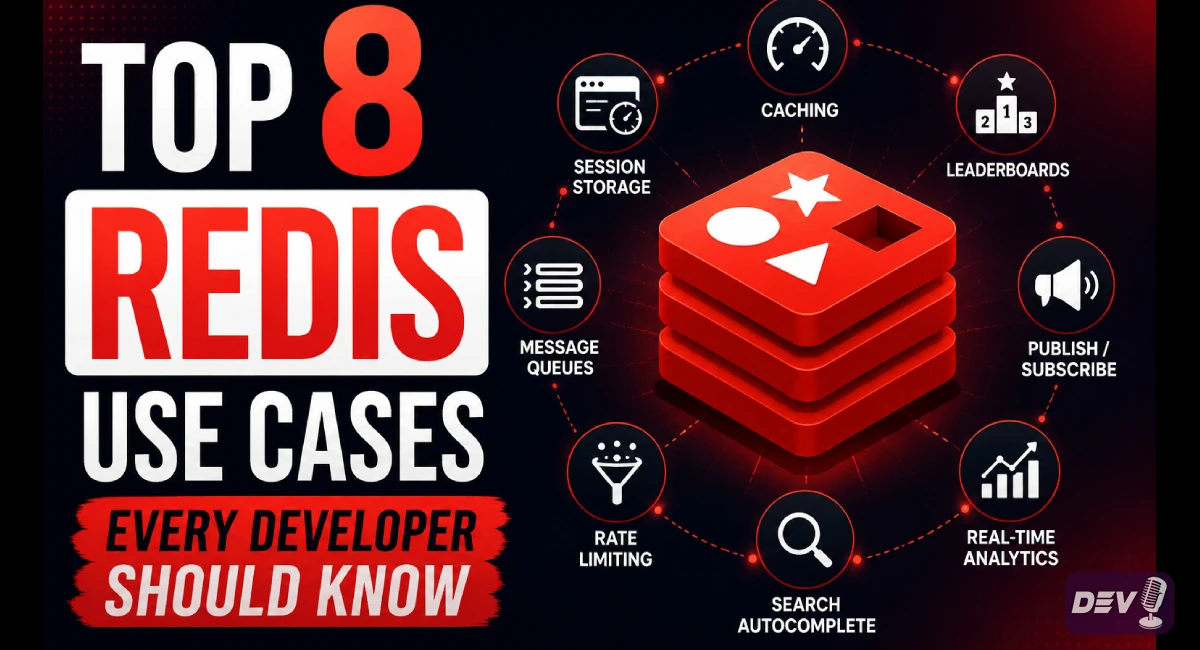
Let's break down the 8 most impactful Redis use cases — with real examples of why each one matters.
1. Caching
The classic — and still the most common use case.
When your application repeatedly fetches the same data from a slow database, Redis acts as a high-speed layer sitting between your app and your database. Instead of hitting PostgreSQL or MySQL every time, your app checks Redis first. If the data is there, it returns instantly. If not, it fetches from the DB and stores it in Redis for next time.
Real impact: Response times drop from hundreds of milliseconds to under 1ms. Database load reduces dramatically.
SET user:profile:123 '{"name":"Alice","plan":"pro"}' EX 3600
GET user:profile:123
Best for: API responses, database query results, rendered HTML fragments, configuration data.
2. Session Management
Stateless servers, stateful users.
In modern distributed systems, your application runs across multiple servers. If user session data lives on one server, requests routed to a different server lose that context. Redis solves this elegantly — store all session data centrally in Redis, and every server can access any user's session instantly.
This is especially powerful for AI agents, where maintaining conversation state, tool call history, and user preferences across requests is critical.
SET session:abc123 '{"userId":42,"role":"admin"}' EX 1800
Best for: User login sessions, shopping carts, multi-step forms, AI agent memory between turns.
3. Rate Limiting
Protect your systems from abuse — at scale.
Whether it's an API endpoint, an LLM call, or a payment gateway, you need to control how many requests a user or service can make in a given window. Redis makes distributed rate limiting trivial using atomic increment operations.
Every request increments a counter. When the counter hits the limit, the request is rejected. The key expires automatically, resetting the window.
INCR rate:user:42:2025-05-24-14
EXPIRE rate:user:42:2025-05-24-14 60
Best for: REST APIs, AI model call throttling, login attempt limits, SMS/email sending quotas.
4. Leaderboards
Real-time rankings without expensive recalculations.
Building a live leaderboard with a traditional database means sorting millions of rows on every page load — painful and slow. Redis Sorted Sets are purpose-built for exactly this. Each entry has a score, and Redis keeps everything sorted automatically.
Adding a score, updating a rank, or fetching the top 10 — all happen in O(log n) time.
ZADD leaderboard 9500 "alice"
ZADD leaderboard 8800 "bob"
ZREVRANGE leaderboard 0 9 WITHSCORES  # Top 10
Best for: Gaming leaderboards, developer activity rankings, sales dashboards, upvote systems.
5. Vector Search & Semantic Caching
Where Redis meets AI.
This is one of the most exciting modern use cases. With Redis Stack, you can store vector embeddings alongside your data and perform similarity searches in milliseconds. This means finding semantically related content — not just exact keyword matches.
Even better: semantic caching lets you reuse LLM responses for similar questions. If two users ask essentially the same thing, Redis returns the cached answer instead of firing another expensive API call to OpenAI or Anthropic.
# Store an embedding vector for a document
HSET doc:1 content "Redis is fast" embedding <vector_bytes>

# Search for semantically similar documents
FT.SEARCH idx "*=>[KNN 5 @embedding $vec]" PARAMS 2 vec <query_vector>
Best for: AI-powered search, RAG pipelines, LLM response caching, recommendation engines.
6. Queues & Streams
Reliable async processing and event coordination.
Redis Lists work as lightweight task queues — push jobs in, workers pop them off. For more powerful use cases, Redis Streams provide a durable, append-only log with consumer groups, acknowledgements, and replay capability. Think of it as a lightweight Kafka for teams that don't need the full complexity.
For AI agent systems, Streams are ideal for coordinating multi-step agent tasks, tracking tool call progress, and processing events asynchronously.
# Add a job to a stream
XADD tasks * type "send_email" to "user@example.com"

# Consumer group reads and acknowledges
XREADGROUP GROUP workers agent1 COUNT 1 STREAMS tasks >
XACK tasks workers <message-id>
Best for: Background job processing, event-driven architectures, agent task coordination, audit logs.
7. Pub/Sub Messaging
Instant message fan-out across services.
Redis Pub/Sub lets one publisher broadcast a message to many subscribers simultaneously — in real time. It's perfect for scenarios where you need instant delivery and don't need messages to persist after delivery.
# Publisher
PUBLISH notifications '{"type":"order_shipped","orderId":789}'

# Subscriber (in another service)
SUBSCRIBE notifications
Best for: Live notifications, real-time dashboards, chat systems, broadcasting config changes across microservices.
Note: If you need message replay or guaranteed delivery, use Redis Streams instead. Pub/Sub is fire-and-forget.
8. Distributed Locks
Prevent chaos in concurrent systems.
When multiple workers, servers, or AI agents run in parallel, they can accidentally process the same job twice or write conflicting data. Redis distributed locks solve this — only one process holds the lock at a time, and it auto-expires to prevent deadlocks.
The standard pattern is Redlock, Redis's algorithm for safe distributed locking.
# Acquire lock (NX = only set if not exists, EX = auto-expire)
SET lock:job:456 "worker-1" NX EX 30

# Release lock (only if we own it)
DEL lock:job:456
Best for: Preventing duplicate payments, coordinating cron jobs, ensuring single-execution in distributed agent pipelines.
The Bigger Picture: Redis in the AI Era
Redis didn't stay still. What started as a fast key-value store has grown into infrastructure that modern AI systems depend on — and that evolution is now official with Redis Iris, a context engine built specifically for AI agents.
Redis Iris acts as a live memory and context retrieval system, giving AI agents access to real-time, relevant context across fragmented data sources. In a world where AI agents need to remember, reason, and act fast — Redis is becoming the connective tissue of intelligent systems.
Redis is no longer just a cache. It's a real-time data platform — and with AI workloads becoming mainstream, its role in production systems is only getting bigger. If you're only using it for caching, now is the time to explore what else it can do for your stack.
Code snippets and fixes for this topic
Get one practical tip every week
New tutorials, fixes and free cheat sheets from DEV Talk, straight to your inbox. No spam, unsubscribe in one click.
Have a question about this post?
Ask the community: other developers and the author can answer.
Get notified about new articles
One click, no email needed. Turn it off anytime with the bell at the top.
Get new articles on your iPhone
Add DEV Talk to your Home Screen, open it, then tap the bell.
Enjoying the content?
If this article helped you, you can support the author with a coffee. It keeps new posts coming.

Comments 0
No comments yet
Be the first to share your thoughts.